
Hello, DIRECT Community!
In our previous guide, we touched on the safety of DMA cheats and mentioned devices like KMBOX. While KMBOX is popular, it’s not always the safest choice for every scenario.
Today, we’re diving into HID devices—what they are, why they’re crucial for secure DMA setups, and how to choose the right one for your needs. Let’s get started!
What Are HID Devices?
HID (Human Interface Device) solutions, like KMBOX, Arduino, or MACPU, act as external controllers that mimic mouse and keyboard inputs. In DMA setups, they’re used to safely move the cursor (for Aimbot) or press keys (for Triggerbot) from a secondary PC (Radar PC) to your Gaming PC. By handling inputs externally, HIDs avoid risky actions like injecting code (mouse_event, SendInput) or writing to game memory (memory_write, shellcode) on your Gaming PC, which could trigger anti-cheat detection.
Why Are HIDs Needed?
Using DMA cheats without an HID risks exposing your setup to anti-cheats like Faceit or Vanguard. HIDs ensure:
The HID market offers diverse options to suit your budget and security needs. Here’s a breakdown of the most popular choices:
The HID market is vast, offering solutions for every need. When selecting a device, consider:
Security: Opt for devices supporting custom firmware (e.g., Arduino, MACPU) to stay ahead of anti-cheats like Faceit or Vanguard.
Ease of Use: KMBOX NET and MACPU are great for beginners, while Arduino suits advanced users.
Budget: Prices range from $5 (MACPU) to $50 (KMBOX NET), with Arduino offering a cost-effective middle ground.
Game Anti-Cheat: For tough anti-cheats (Faceit), prioritize custom firmware; for lighter ones (EAC, BE), KMBOX NET may suffice with updates.
Setup Tips for Safety
To maximize your HID’s effectiveness and stay undetected:
Use a secondary PC to handle all HID inputs, keeping your Gaming PC clean.
Invest in private firmware for Arduino or MACPU to mimic legitimate devices.
Avoid public firmware, as they’re often detected by advanced anti-cheats.
Monitor gameplay stats to avoid manual bans or AI detection.
— The DIRECT Team
In our previous guide, we touched on the safety of DMA cheats and mentioned devices like KMBOX. While KMBOX is popular, it’s not always the safest choice for every scenario.
Today, we’re diving into HID devices—what they are, why they’re crucial for secure DMA setups, and how to choose the right one for your needs. Let’s get started!
What Are HID Devices?
HID (Human Interface Device) solutions, like KMBOX, Arduino, or MACPU, act as external controllers that mimic mouse and keyboard inputs. In DMA setups, they’re used to safely move the cursor (for Aimbot) or press keys (for Triggerbot) from a secondary PC (Radar PC) to your Gaming PC. By handling inputs externally, HIDs avoid risky actions like injecting code (mouse_event, SendInput) or writing to game memory (memory_write, shellcode) on your Gaming PC, which could trigger anti-cheat detection.
Why Are HIDs Needed?
Using DMA cheats without an HID risks exposing your setup to anti-cheats like Faceit or Vanguard. HIDs ensure:
- Maximum Safety: Inputs are processed outside the Gaming PC, keeping your system clean from detectable code.
- Seamless Control: Precise cursor movement and key presses for Aimbot and Triggerbot functionality.
- Anti-Cheat Evasion: Properly configured HIDs mimic legitimate devices, reducing detection risks.
The HID market offers diverse options to suit your budget and security needs. Here’s a breakdown of the most popular choices:
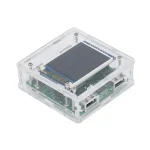 KMBOX NET ($20–50)
A user-friendly, plug-and-play device available at kmbox.top It’s easy to set up but has limitations:
Pros: Simple to use, widely available.
Cons: Recent reports suggest it’s less safe on Valorant/Faceit due to its closed SDK, limiting custom firmware. Requires frequent updates from the official site.
Recommendation: Check for firmware updates regularly to maintain safety.
A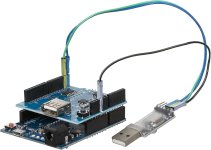 rduino ($10–20)
A versatile, DIY option for tech-savvy users. Requires soldering and additional modules for dual-PC setups.
Pros: Fully customizable firmware, highly secure (even on Faceit) with proper configuration.
Cons: Needs manual assembly and technical know-how.
Recommendation: Ideal for users willing to invest time in crafting a tailored, undetectable solution.
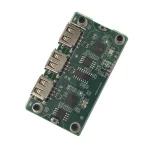 MACPU ($5–15)
An affordable, plug-and-play device that auto-configures firmware based on your mouse.
Pros: Easy setup, no soldering, high-quality performance.
Cons: Less customizable than Arduino but still secure.
Recommendation: Perfect for users seeking a hassle-free, reliable HID.
The HID market is vast, offering solutions for every need. When selecting a device, consider:
Security: Opt for devices supporting custom firmware (e.g., Arduino, MACPU) to stay ahead of anti-cheats like Faceit or Vanguard.
Ease of Use: KMBOX NET and MACPU are great for beginners, while Arduino suits advanced users.
Budget: Prices range from $5 (MACPU) to $50 (KMBOX NET), with Arduino offering a cost-effective middle ground.
Game Anti-Cheat: For tough anti-cheats (Faceit), prioritize custom firmware; for lighter ones (EAC, BE), KMBOX NET may suffice with updates.
Setup Tips for Safety
To maximize your HID’s effectiveness and stay undetected:
Use a secondary PC to handle all HID inputs, keeping your Gaming PC clean.
Invest in private firmware for Arduino or MACPU to mimic legitimate devices.
Avoid public firmware, as they’re often detected by advanced anti-cheats.
Monitor gameplay stats to avoid manual bans or AI detection.
— The DIRECT Team
Last edited: